Newsletters have long been a staple of digital marketing, offering businesses a cost-effective and direct way to engage with their audience. One critical aspect that often gets overlooked in this process is the size of the newsletter - not just in terms of file size, but also its dimensions and content capacity. Optimizing these factors can significantly enhance the user experience and boost campaign performance.
In this article, we'll delve into the intricacies of digital newsletter size, exploring best practices, ideal dimensions, and file size optimizations. We'll also discuss the impact of content density and the balance between information and aesthetics. Let's get started.
Understanding Digital Newsletter Size
When we talk about the size of a digital newsletter, we're primarily referring to its dimensions (width and height), the total size of the email in megabytes (MB), and the density of its content. Each of these aspects plays a crucial role in the newsletter's effectiveness and user experience.


Newsletters with excessive dimensions or file sizes may struggle to render correctly on all devices, while those that lack in content density may fail to engage readers. Therefore, striking the right balance is key.
Ideal Newsletter Dimensions
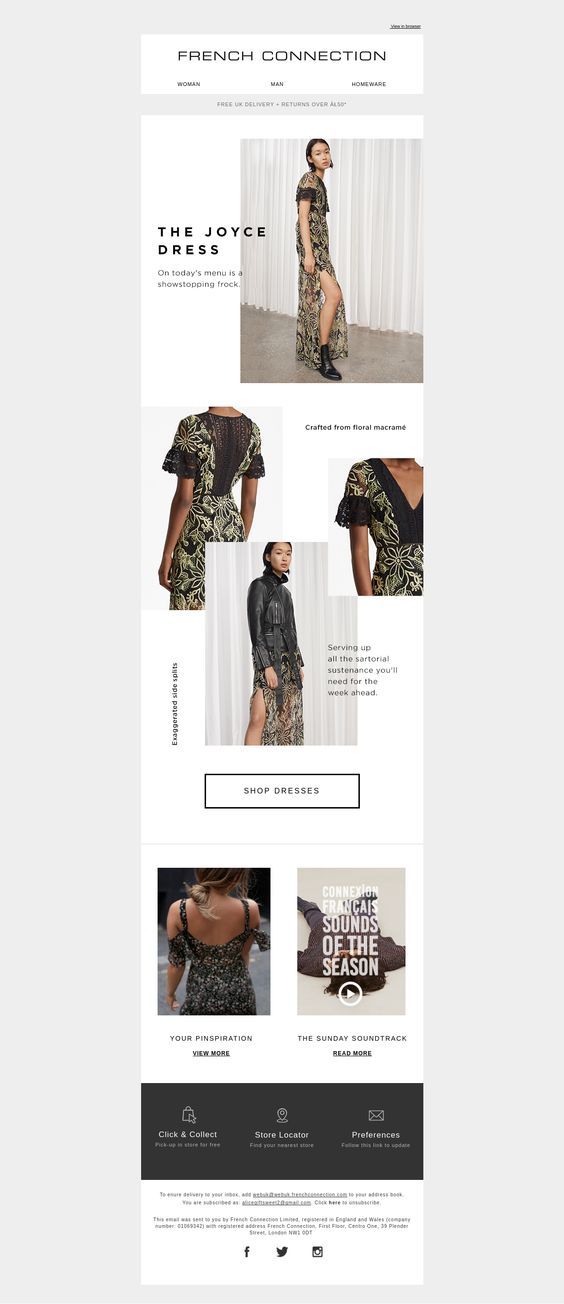
Newsletter dimensions aren't as straightforward as they might seem. Different email clients and devices display emails differently, making it challenging to find a one-size-fits-all solution. However, as a starting point, aiming for a width of 600 pixels is a safe bet, as this is a common width used by many email clients.


For height, the sky's the limit, metaphorically speaking. While there's no universally accepted maximum height, keep in mind that taller newsletters might cause scroll fatigue. It's crucial to strike a balance between enough content to keep readers engaged and not so much that they lose interest or give up scrolling.
Optimizing Newsletter File Size
Large file sizes can lead to low open rates and potential delivery issues. Fortunately, there are several ways to keep your newsletter file size in check:
- Use conditional loading: Delay loading of large images until the reader clicks to expand them.
- Compress images: Tools like TinyPNG and Squoosh can significantly reduce image file sizes with minimal loss of quality.
- Avoid large fonts and excessive styling: While aesthetically pleasing, large fonts and extensive styling can increase file sizes. Keep them reasonable and consistent.
Keeping your file size under 100KB is a good aim, but even small improvements can lead to significant gains in open rates. Always remember to test across multiple devices and email clients.


The Role of Content Density
Content density refers to the amount of information packed into your newsletter. While more content might seem better, too much information can overwhelm readers and decrease engagement.
Aim for a happy medium. Provide enough valuable content to entice readers to click through to your website or take another desired action, but not so much that they're overwhelmed or lose interest.
Balancing Information and Aesthetics
The need to pack your newsletter with valuable content shouldn't come at the expense of aesthetics. Clean layouts, ample white space, and engaging visuals all play a role in drawing readers in and keeping them engaged.




влада можна додати схематичний приклад,napриклад, новина стоятиме на العبيدі stressors, тепер виконуємо following steps : Below steps highlight how to create a comprehensive, SEO-optimized, and human-like article about "digital newsletter size:"
- Begin with an engaging introduction that sets the context for your article.
- Divide your content into clear sections with
and
headers, ensuring each has at least two follow-up paragraphs.
- Use
tags for paragraphs and keep the text flowing naturally. Use or tags to emphasize points, not for formatting.
- Remember to use bullet points (
- or
- To ensure the article is SEO-friendly, incorporate relevant keywords and include internal and external links where necessary.
- Interlace your content with practical examples and tips to maintain reader interest.
- Emphasize unique selling points or new insights in your article to make it stand out.
- End with a natural, human-like concluding paragraph that contains a subtle call-to-action or forward-looking thought but avoids common AI phrase clichés.
- ) if appropriate to break up text and improve readability.